Running Local Models on 8GB Apple Silicon
Written by Ogenrwoth Jim Frank
Running local models on 8GB Apple Silicon
Have you ever run a large language model locally? I tried a Qwen model through Ollama. In this age, at about 3 tokens per second, you are better off watching a movie. Unless you are in Uganda and the internet can get shut down nationwide, eating your precious RAM like that is usually not worth it. Honestly, you should probably not consider it on a small machine.
This is my story of what I am comfortable running locally, what burned my laptop, and how I made it usable.
What actually makes sense on my machine
I am on an 8GB Apple Silicon Mac. No discrete GPU. No loud fan to save me when things get hot.
At this point the models I am comfortable running locally are not chat LLMs. They are transcription models (Whisper-class) and TTS models. Those jobs fit the machine better. Short audio in, useful audio or text out, without pretending I have a workstation.
The catch is that Apple Silicon’s GPU help is not always obvious the first time you try.
First surprise: every CPU core at 100%
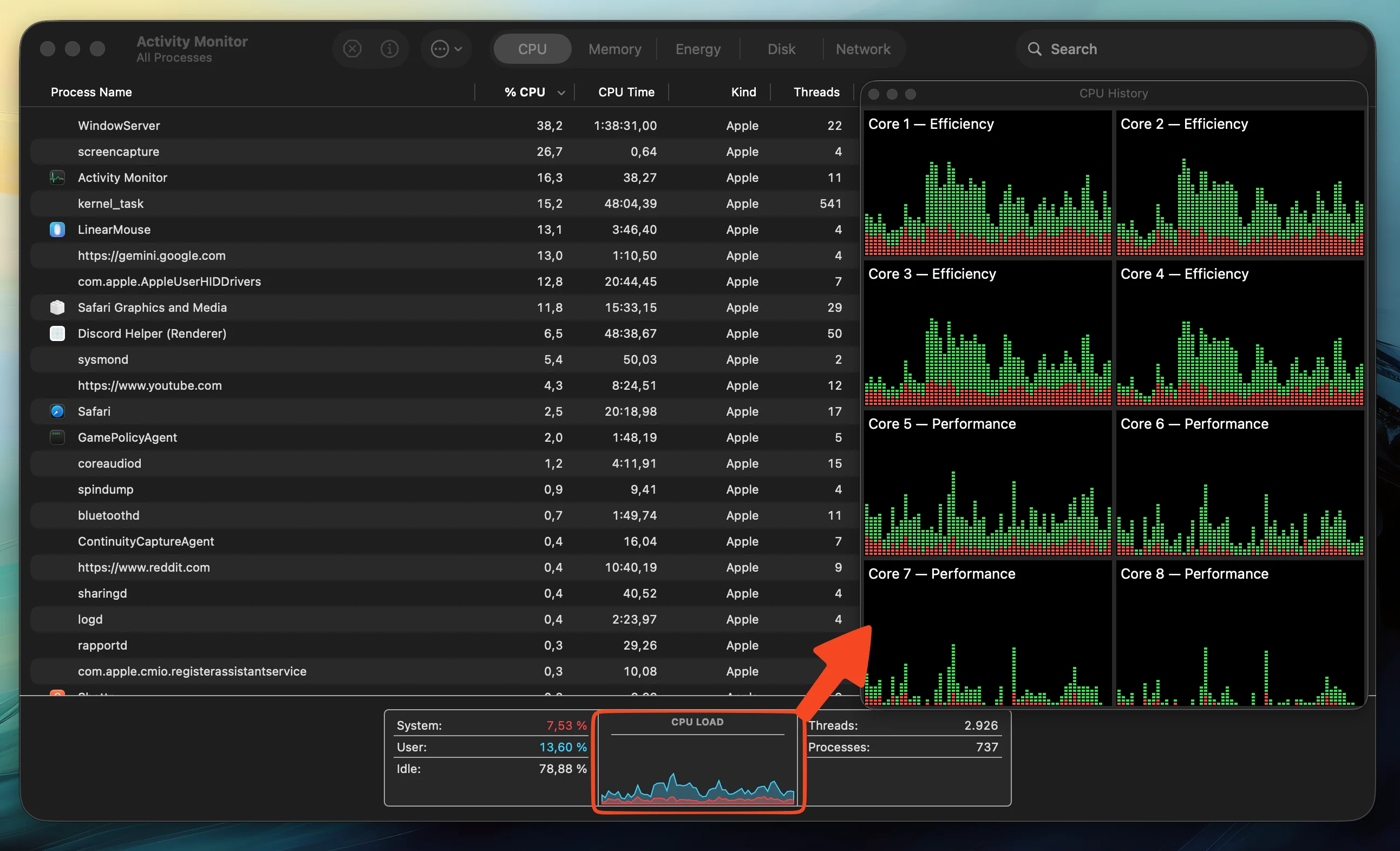
The first time I ran these workloads, I was not ready for the impact. You should have seen my face when Activity Monitor showed every CPU core pegged at 100%.
Then I remembered Apple Silicon has a GPU sitting in the same chip, sharing the same memory pool. The problem was not that the hardware was weak. The problem was that my stack was happily burning CPU while the GPU sat there.
That sent me looking for Apple’s MLX path. MLX is built for this exact setup. Arrays live in unified memory, and work can run on the GPU through Metal without the usual “copy everything to VRAM” dance you get on other platforms.
For Whisper-style transcription, that usually means using an MLX Whisper build instead of a CPU-bound path. On Apple Silicon, MLX Whisper tends to use the Metal GPU by default once you are on the right package. For TTS and other models, the practical move is to pull weights that were already converted and quantized for MLX, not fight a generic PyTorch build on CPU.
A simple starting point:
pip install mlx mlx-whisper
Then use MLX-ready model weights instead of hoping Ollama or a CPU default will magically use the GPU the way you want.
Then the laptop started cooking
Once the compute was actually on the right hardware, another issue showed up: heat.
The culprit for me was a Qwen3 TTS model around the 1.7B class. It worked, but it cooked the machine. Fanless Mac, sustained load, and suddenly I was thinking less about quality and more about whether I was melting something.
So I cut the operating cost.
Why I picked 8-bit, not 4-bit
My first thought was quantization. Smaller weights, less memory pressure, less heat.
I did not go all the way down to 4-bit for audio. With speech and music-like material, errors are often subtle. Aggressive quantization can introduce noise you feel more than you can cleanly measure. For TTS, that tradeoff mattered to me.
So I moved to an 8-bit quantized MLX build instead. That is where the MLX Community on Hugging Face became useful. They publish models already quantized for Apple Silicon, so you spend less time converting and more time testing what your machine can actually sustain.
The 8-bit model worked well enough. Roughly a second of audio generated per second of wall clock. I was willing to wait for that. On 8GB RAM, that felt like the honest limit, and I am fine living there.
Keeping the GPU under 80°C
Speed was only half the problem. Heat was the other half.
Because my Mac does not have a fan, I set a simple rule: do not let the GPU keep climbing past about 80°C. When it gets there, pause. Let it cool. Then continue.
It is not elegant. It is practical. Long unbroken runs are what push a fanless machine into a bad place. Short bursts with breathing room are how I keep running Whisper and TTS without fearing the hardware.
What I take away
- Large local chat models on 8GB RAM are usually a bad deal unless you have a real offline constraint.
- Transcription and TTS are a better local fit on Apple Silicon at this memory size.
- If every CPU core is maxed out, check whether you are actually using MLX and Metal.
- For audio, 8-bit quantization can be a better compromise than 4-bit.
- Use mlx-community when you want Mac-ready weights.
- On a fanless machine, thermal pauses are part of the workflow, not a failure.
Quick setup notes
# Apple Silicon local stack starting point
pip install mlx mlx-whisper

# Prefer MLX Community weights already quantized for Mac
# https://huggingface.co/mlx-community
Watch temperature while you run. If the GPU is climbing past your comfort threshold, stop and cool down before the next chunk.
Closing
This is my story with running models locally. A little bit of a rant, yes. I did not have many people to tell it to, so I wrote it down. If you are also on a small Apple Silicon machine trying to do useful local AI without destroying your laptop, maybe this saves you a few evenings.